1. What Makes a Self-Ordering Kiosk Suitable for QSRs?
A self-ordering kiosk for quick service restaurants allows customers to browse menus, customize meals, select add-ons, and complete payment without placing the entire order through a cashier.
A suitable system should offer:
- A responsive touchscreen with clear menu navigation
- Attractive food images and customizable menu layouts
- Support for meal combinations, toppings, and special requests
- Compatible payment options, including cards and contactless payments
- Receipt printing or order confirmation
- Integration with the restaurant’s POS and kitchen display system
When these functions work together, customers can place orders independently while restaurant staff focus on food preparation and service.
2. Which Type of Restaurant Ordering Kiosk Is Best?
Different restaurant environments require different hardware configurations.
Freestanding Self-Ordering Kiosks
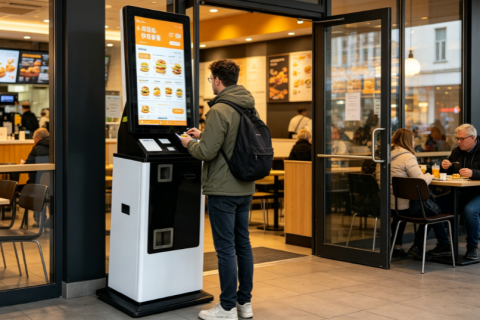
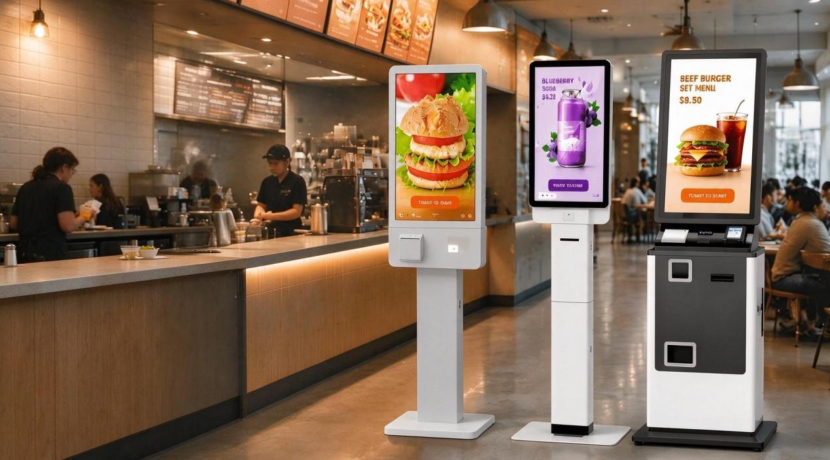
A freestanding self-service kiosk is suitable for busy fast-food restaurants, food courts, and quick service chains. Its larger display provides space for food images, meal categories, customization options, and promotional offers.
Multiple units can be installed near the entrance or ordering area to provide additional ordering points during lunch and dinner rushes.
Countertop Ordering Kiosks
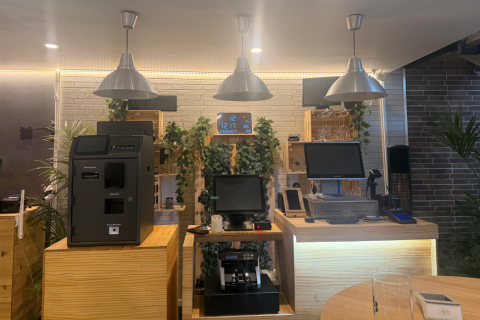
A countertop self-ordering kiosk works well in cafés, bakeries, juice bars, and smaller restaurants with limited floor space. It offers a compact alternative for businesses that want to introduce self-service ordering without redesigning the entire customer area.
Wall-Mounted Kiosks
A wall-mounted restaurant kiosk can be useful in narrow ordering areas, takeaway shops, and compact food service locations. It keeps the floor clear and can help organize customer movement when installed in a suitable position.
The best form factor depends on customer volume, available space, menu complexity, and the restaurant’s service model.
3. POS and Kitchen Integration Should Come First
One of the most important considerations when choosing a restaurant self-ordering kiosk is software compatibility.
The kiosk should work with the restaurant’s existing point-of-sale (POS) system and, where required, its kitchen display system (KDS). Orders, menu prices, product availability, and customization options should remain consistent across the ordering channels.
For example, when a customer orders a burger meal and changes the side dish, the order details should reach the kitchen accurately. If a menu item becomes unavailable, the kiosk should reflect that change through the supported software integration.
Before purchasing hardware, restaurant operators should confirm API availability, integration costs, payment compatibility, and whether the existing software provider permits third-party kiosk connections.
4. Improve Order Value With Menu Customization
A self-ordering kiosk can present relevant add-ons and upgrades at appropriate points in the ordering process.
For example, a burger restaurant might offer extra cheese, a larger drink, or a combo meal. A pizza shop could suggest additional toppings, while a coffee shop might offer a pastry alongside a beverage.
These QSR self-ordering kiosk features can make promotions more consistent and help customers explore available options at their own pace. Actual sales improvements depend on menu design, pricing, customer behavior, and how the suggestions are implemented.
5. Match Payment Hardware to Your Customers
Payment requirements vary by country, restaurant format, and target customer group.
A fast food ordering kiosk may support cash, bank cards, NFC contactless payments, mobile wallets, or QR code payments, depending on the payment provider and hardware configuration.
Some locations may also require cash acceptance and change dispensing. In these cases, the kiosk needs additional cash-handling modules and a suitable software workflow.
Restaurants should select payment hardware based on local demand and operational requirements rather than assuming every location needs the same configuration.
6. Consider Customization for Multi-Location Restaurants
Restaurant chains and kiosk solution providers may need more than a standard off-the-shelf terminal.
A customizable QSR kiosk solution can be configured with different screen sizes, printer options, scanners, payment modules, mounting styles, and enclosure designs. Software integration can connect the hardware to existing restaurant platforms where the required interfaces are available.
For multi-location deployments, centralized menu management, remote device monitoring, and consistent hardware configurations can also simplify maintenance and expansion.
How to Choose the Best Self-Ordering Kiosk
Before making a decision, evaluate the following factors:
- Restaurant type and expected order volume
- Screen size and installation format
- Payment methods and peripheral requirements
- Menu customization and language options
- POS and kitchen system compatibility
- Hardware durability and maintenance access
- Customization, branding, and deployment quantity
The best kiosk is the one that fits the actual restaurant workflow—not necessarily the one with the most expensive hardware.
Build Your Restaurant Self-Ordering Solution
A well-designed self-ordering kiosk combines intuitive customer interaction, reliable hardware, flexible payment options, and compatible restaurant software.
Diversity Kiosk provides customizable self-service kiosk hardware for restaurant ordering applications, with flexible configurations and OEM/ODM support. Contact us to discuss your preferred screen size, peripheral configuration, installation format, and integration requirements for your next QSR project.